Docker Explained for Non-DevOps Developers
Modern developers are expected to "know Docker." But for many non-DevOps developers, Docker often feels like just enough magic to be dangerous.
You can run a container. You can copy a Dockerfile. You may even deploy it once. Yet when something breaks—networking, ports, images, environments—the abstraction disappears, and the complexity hits all at once.
This guide breaks Docker down without DevOps jargon, explains why containers exist, and shows why abstraction layers are becoming essential for modern teams.
The Problem Docker Was Trying to Solve
Before Docker, deploying an application usually meant:
- Manually configuring servers
- Installing language runtimes (Node, Python, Java, etc.)
- Matching OS-level dependencies
- Debugging "works on my machine" issues
Every environment was slightly different. Every deployment was fragile.
Docker introduced a simple but powerful idea: Package the application and everything it needs into a single unit.
That unit is a container.
What Exactly Is a Container? (Plain English Version)
Think of a container as a lightweight, isolated box that contains:
- Your application code
- Runtime (Node, Python, JVM, etc.)
- Libraries and dependencies
- Config defaults
If it runs inside the container once, it will run the same way everywhere. Laptop. Staging. Production. Cloud. No surprises.
What Containers Are NOT
To avoid common misconceptions:
- Not full virtual machines — Containers share the host OS kernel, making them much lighter than VMs
- Not a security boundary by default — Containers provide isolation, but additional hardening is needed for true security
Docker Image vs Docker Container (Quick Clarity)
Non-DevOps confusion often starts here:
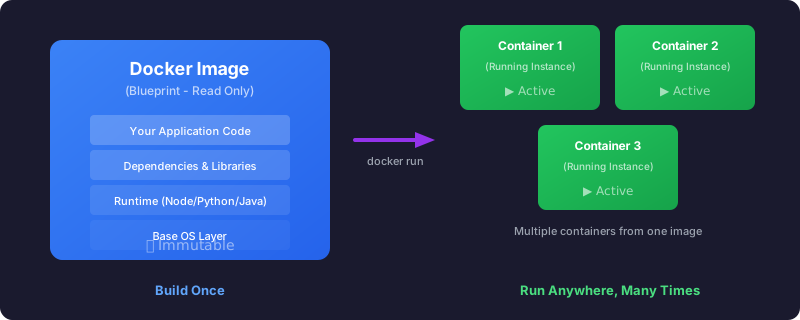
Docker Image → A blueprint (read-only)
Docker Container → A running instance of that blueprint
You build an image. You run a container from it. That's it.
A Simple Dockerfile Example
Here's what a minimal Dockerfile looks like for a Python application:
# Start from a Python base image
FROM python:3.11-slim

# Set working directory inside the container
WORKDIR /app

# Copy and install dependencies
COPY requirements.txt .
RUN pip install -r requirements.txt

# Copy your application code
COPY . .

# Command to run when container starts
CMD ["python", "app.py"]
This file is the "recipe" that Docker uses to build your image. Once built, the image can be run as a container anywhere Docker is installed.
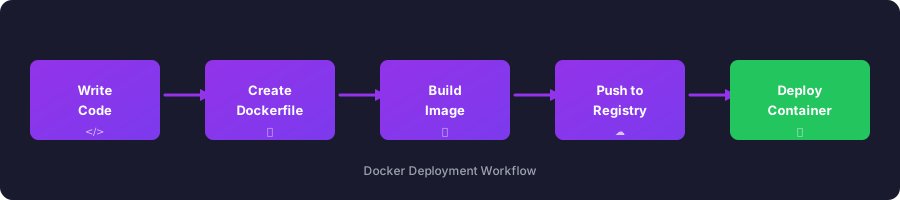
The Typical Docker Workflow
Why Docker Still Feels Complex to Many Developers
Docker solved infrastructure inconsistency—but it didn't remove complexity. It moved it lower in the stack.
As a developer, you still deal with:
- Dockerfiles
- Exposed ports
- Environment variables
- Image tagging and versioning
- Container restarts
- Logs and health checks
- Deployment pipelines
Docker is powerful—but raw Docker is not developer-friendly at scale. This is where abstraction matters.
Abstractions Don't Hide Reality—They Tame It
Good abstractions don't prevent you from understanding Docker. They prevent you from re-solving the same problems repeatedly.
Think about what most developers actually want:
- Push code
- Configure environment values
- Deploy safely
- Roll back if needed
Not:
- Writing deployment YAMLs
- Debugging container orchestration quirks
- Managing infrastructure glue code
Where SnapDeploy Fits In
SnapDeploy sits on top of Docker, not instead of it. It keeps the benefits of containers while removing unnecessary operational overhead.
With SnapDeploy, developers focus on:
- Application behavior
- Environments (dev / staging / prod)
- Release confidence
Instead of:
- Docker internals
- Manual deployment logic
- Infrastructure-specific edge cases
Docker becomes the engine. SnapDeploy becomes the driver interface.
Why This Matters for Non-DevOps Teams
For teams without dedicated DevOps engineers:
- Docker alone increases cognitive load
- Abstractions restore velocity
- Consistency replaces tribal knowledge
You don't need everyone to be an infrastructure expert. You need systems that respect developer attention.
Docker Knowledge Still Matters—Just Not Everywhere
Understanding Docker basics is valuable:
- What a container is
- Why images exist
- How isolation works
But you don't need to live in Dockerfiles to ship reliable software.
Modern platforms succeed when they:
- Embrace Docker's strengths
- Reduce its operational surface area
- Let developers stay developers
Key Takeaways
- Containers package your app + dependencies into a single, portable unit
- Images are blueprints; containers are running instances
- Docker solved "works on my machine" but introduced new operational complexity
- Abstractions like SnapDeploy let you use Docker's power without managing its complexity
- You don't need to master Docker to deploy reliable containerized applications
Final Thought
Docker changed how applications are shipped. Abstractions like SnapDeploy are changing who needs to think about shipping.
If Docker is the foundation, SnapDeploy is the scaffolding that lets teams build faster—without breaking things.
And that's exactly how infrastructure should feel.
Ready to Deploy?
Get 100 free hours to deploy and test your applications. No credit card required.
Start Free Trial